Search This Blog

Showing posts with label Azure Data Factory. Show all posts

September 10, 2019

Azure Data Factory - Execute Pipeline Activity

Execute Pipeline activity is used to call another Azure Data Factory Pipeline. This will help to develop reusable pipelines and use it in other pipelines

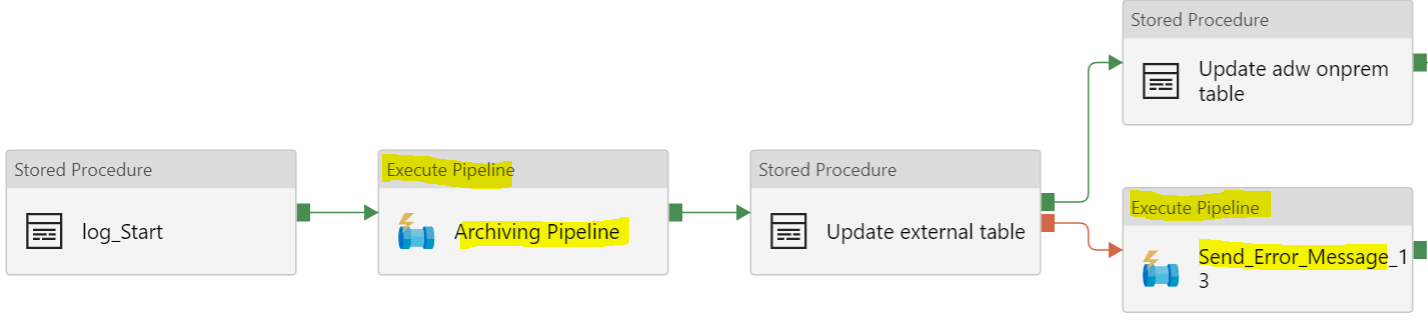
For example, you can create a separate pipeline to archive the files after processing. You can create one pipeline for archiving files (move the blobs or files to different folders) and call that pipeline in multiple pipelines. This will help you to reduce development time and increase code reusability.

Similarly, you can create a separate pipeline for sending emails in Azure data factory and re-use in multiple pipelines.


In the following screen-shot, we are calling two different pipelines (Archiving Pipeline, Send_Error_Message)


For more information, please check the following
https://docs.microsoft.com/en-us/azure/data-factory/control-flow-execute-pipeline-activity


September 08, 2019

Azure Data Factory - If Condition activity

If activity is used to perform different activities based on the input expressions. In the following, we are checking if the file is present or not using "GetMetaData" activity. If file presents perform the activities in if True activities. If file does not present then Edit the False activities.

Passing input values for If condition activity


Set validation expression in settings for If condition activity.


Adding activity for True or False conditions.


For more information, please check https://docs.microsoft.com/en-us/azure/data-factory/control-flow-if-condition-activity

September 07, 2019

Azure Data Factory - For Each Activity

"ForEach" activity in Azure Data Factory is used to loop thru each row of the input and perform the actions based on the data.

Following screenshot shows two activities one is GetMetaData and second one is ForEach loop. The output of the GetMetaData is passed to the ForEach activity in the Settings. If the checkbox for "Sequential" is selected all the activities are performed in sequence for all the child items. If parallel execution is needed we need to un-check "Sequential".


"ForEach" activity can be used to an output of Lookup activity as well.

You can perform multiple activities for each row of data received for the input of ForEach activity. You can add all the activities by going to Activities and Edit Activities.

Limitations and workarounds

Here are some limitations of the ForEach activity and suggested workarounds.

Limitation Workaround
You can't nest a ForEach loop inside another ForEach loop (or an Until loop). Design a two-level pipeline where the outer pipeline with the outer ForEach loop iterates over an inner pipeline with the nested loop.
The ForEach activity has a maximum batchCount of 50 for parallel processing, and a maximum of 100,000 items. Design a two-level pipeline where the outer pipeline with the ForEach activity iterates over an inner pipeline.

For more information, please check the documentation at  https://docs.microsoft.com/en-us/azure/data-factory/control-flow-for-each-activity

September 04, 2019

Azure Data Factory Stored Procedure Activity

Stored Procedure activity is used to execute Stored Procedure in Azure Data Factory. You can use this to maintain audit logs, update metadata information, to track files in Azure blobs to  MetaData activity output. To create dynamic external tables in Azure Data Warehouse.

To pass the parameter values to Stored Procedure, you can use pipeline parameters. Use dynamic content to pass dynamic values. You can import all the stored procedure parameters using import parameters


For more information on Stored Procedure activity, Please check the following https://docs.microsoft.com/en-us/azure/data-factory/transform-data-using-stored-procedure

September 03, 2019

Azure Data Factory Execute Pipeline Activity

Execute Pipeline Activity is used to call a different pipeline in Azure Data Factory. It is similar to calling Execute Package task in SSIS.

The main purpose of Execute Pipeline is to develop common pipelines which can be used in multiple pipelines and call them when needed. This helps to reduce development time and reduce maintenance of code.

If the calling pipeline needs to wait till the called pipeline is completed, set the "waitOnCompletation" to True.

Check the following for more details https://docs.microsoft.com/en-us/azure/data-factory/control-flow-execute-pipeline-activity


September 02, 2019

Azure Data Factory Lookup activity

Lookup activity in Azure Data Factory is different from the lookup activity present in SSIS. Lookup activity in Azure Data Factory is used to execute Stored Procedure with output.

It can return the first row or multiple rows of data from the stored procedure. The output can be used to input for each loop.

The lookup activity supports a max of 5000 rows as output.

For more details, please check the following https://docs.microsoft.com/en-us/azure/data-factory/control-flow-lookup-activity documentation

August 28, 2019

Azure Data Factory - GetMetaData activity


GetMetaData activity is used to get file information which is present in Azure storage. This will get file size, row count, lastModifiedDate, file exists and other information.

Following screenshot shows how to get all files information present in a particular folder. The folder name is passed as pipeline parameter


The output of this activity can be used as input to Stored Procedure activity. It can be used to store the metadata information in Azure SQL Database

For more information check the following